Authentication
This page covers the authentication process for integrating gateways and devices with the SmartHQ Device Adapter API, including how to obtain the necessary credentials and tokens for different components in the gateway ecosystem. Understanding this authentication flow is essential for building adapters or gateways that need to register devices, report device state, and handle commands within the SmartHQ platform.
Note
This authentication page is completely separate from the authorization page describing the device control and monitoring use case. However, that authorization is a prerequisite for the steps described on this page.
Gateway Provisioning Process
Before a gateway can manage devices in SmartHQ, it must first be provisioned (registered) to a user's account. This process involves multiple steps and different credentials to ensure secure authentication. The diagram below illustrates the flow:
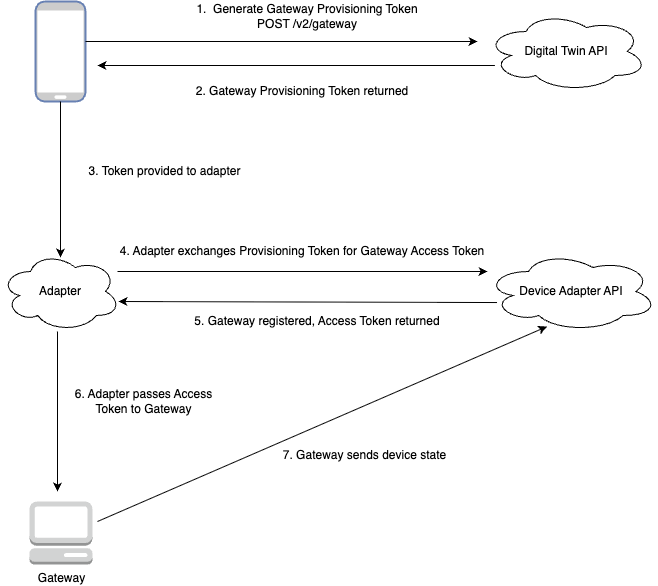
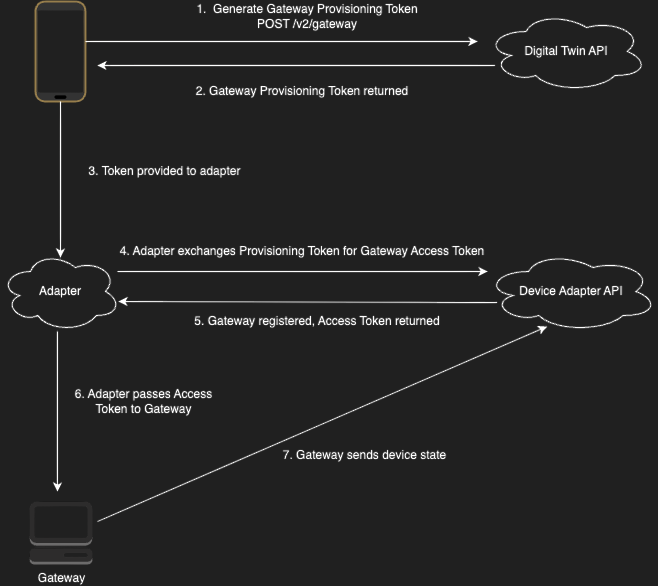
Process to Provision a Gateway to an Account:
- The client gets a Gateway Provisioning Token (GPT) by calling
POST /v2/gatewayon the Digital Twin API. Using the Digital Twin API requires completing the separate authorization process to obtain an access token for that API. - The Gateway Provisioning Token (GPT) is returned to the client.
- The client passes the GPT to an adapter. In the case of a physical gateway, the client may pass the token to the gateway first, which then passes it to its adapter.
- The adapter calls
POST /v2/gateway/provisionon the Device Adapter API. - The gateway gets registered to the user's account, and a Gateway Access Token is returned to the adapter.
- The adapter passes the Gateway Access Token to the gateway.
- The gateway can now use the Gateway Access Token to call the Device Adapter API directly. For example, the gateway can send the state of a device to SmartHQ using
POST /v2/device/state.
Important:
- All requests made to the Device Adapter API must have an "Authorization" header set to the Gateway Access Token value.
- All requests to the Device Adapter API must use the following base URL:
https://device.mysmarthq.com
POST /v2/device/state
Host: device.mysmarthq.com
Content-Type: application/json
Authorization: 280f20000000000-YOUR-GATEWAY-ACCESS-TOKEN
Notes:
- A Gateway Provisioning Token is only valid for one hour.
- Depending on the implementation, if the gateway communicates with its adapter over a protocol other than HTTP, the adapter may choose to store the token and make calls to the Device Adapter API on the gateway's behalf.
Tokens
Gateway access involves different credentials, each serving a different purpose:
| Credential | Purpose | Key Details |
|---|---|---|
| Gateway Provisioning Token | Temporary token used to register a gateway to a user's account | - Single-use - Valid for 1 hour - Used to provision a gateway via POST /v2/gateway/provision- Obtained by client from Digital Twin API POST /v2/gateway |
| Gateway Access Token | Authorizes Device Adapter API requests for gateway operations | - Reusable - Valid indefinitely until gateway is re-registered - Used in Authorization header for all Device Adapter API calls (not including schema endpoints)- Received from POST /v2/gateway/provision response |
Note: If a physical gateway is factory reset and loses its Gateway Access Token, it must be reprovisioned using a new Gateway Provisioning Token to obtain a new Gateway Access Token.
Adapter Credentials
When an adapter is created by a SmartHQ administrator, you will receive two important pieces of information for authentication:
| Credential | Purpose | Usage |
|---|---|---|
| Adapter ID | Uniquely identifies your adapter to the SmartHQ Device Adapter API | Included in request body as adapterId for adapter-specific endpoints |
| Adapter Secret | Authenticates your adapter to the Device Adapter API | Included in request body as adapterSecret alongside the Adapter ID |
Key Details:
- Both credentials are generated automatically when the adapter is created.
- Credentials are valid indefinitely until the adapter is reconfigured.
- They are used together in the JSON request body (not in headers like OAuth).
- Required for adapter endpoints:
POST /v2/gateway/provisionandPOST /v2/gateway/presence. (See below).
Gateway Authentication
At the end of the Gateway Provisioning Process, a Gateway Access Token is returned and should be stored by the gateway to authenticate API requests. This token is valid indefinitely until the gateway is re-registered. In the case of a physical gateway that gets factory reset and the token is lost, the gateway will need to be reprovisioned to get another Gateway Access Token.
To authenticate to the API, include the token in the Authorization header in the request:
GET /v2/gateway HTTP/1.1
Host: device.mysmarthq.com
Authorization: 2a6c656d8d105fefd373370d3cddcadcb680f27968286a000000000000000000-gue1i6bim1idgxfjie11rit6abcdefgh
Adapter Gateway ID
The adapterGatewayId is a unique identifier generated by the developer for each gateway.
Think of it as the “nameplate ID” for the gateway. SmartHQ does not issue this — it must be created by the developer.
How to Create It
-
The
adapterGatewayIdmust be unique per gateway instance (not shared across different gateways). -
It can be generated using any method that ensures uniqueness and stability (UUID is recommended).
Example:
adapterGatewayId: "rt9e83niwhgp2s2"
Where to Use It
-
During Provisioning
The
adapterGatewayIdis included in the request body ofPOST /v2/gateway/provision. -
Inside the Adapter
-
The adapter should store this
adapterGatewayId. -
Whenever SmartHQ sends callbacks or messages to your adapter, this ID can be used to identify which gateway the message belongs to.
- Note: In the callback messages, the
gatewayIdfield will contain youradapterGatewayIdvalue.
- Note: In the callback messages, the
- If multiple gateways are running, each should have its own
adapterGatewayId.
-
Summary
-
The developer creates the adapterGatewayId.
-
It is sent during provisioning.
-
It is stored and used to track that specific gateway instance.