APIs Overview
The following is a high-level description of each API offered through the SmartHQ Developer Portal. This page explains each API's use case and connection to other APIs.
Identity and Access Management API
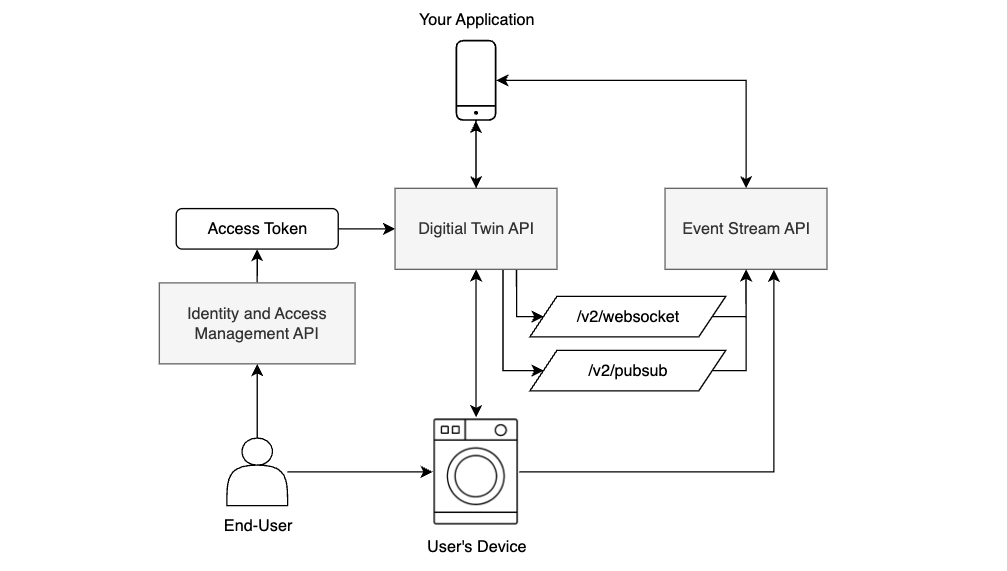
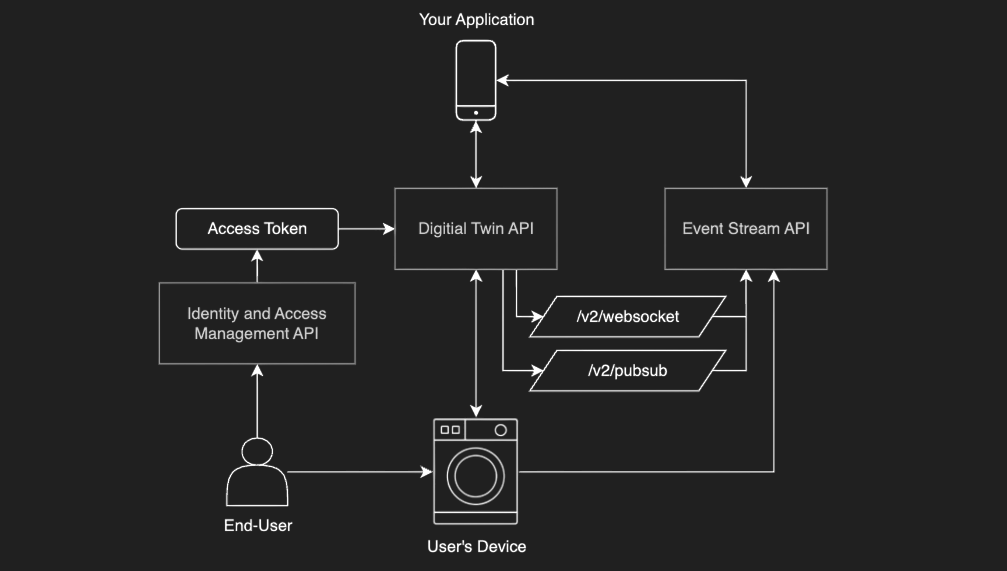
The Identity and Access Management API is an OAuth 2.0 API that allows your application's users to securely grant you access to their SmartHQ devices. When the user completes the authorization process, you gain an access token that can be used to authenticate future API requests. The access token informs the SmartHQ system that you have the clearance needed to perform actions for an end-user's device. To learn more, see Authorization.
Note: The authorization system used for the Property Management API is Auth0 and is completely separate from the Identity and Access Management API. The authorization endpoint for the Property Management API is contained in the API specification itself. Unless you have specific property management needs, the Identity and Access Management API is the API you should use for authorization.
Digital Twin API
The Digital Twin API is the backbone of the SmartHQ APIs. It enables applications (e.g., mobile apps, web apps) to interact with SmartHQ.
This API is designed to let your application access the current state of a device—for example, the remaining time on a wash cycle. Additionally, this API provides functionality to send commands to a device, such as to set the temperature of a refrigerator.
This is a synchronous API, which means it follows a simple request–response (pull) model: you send a request and wait for the server’s reply. The server won’t send any updates through this API unless directly requested. For real-time, asynchronous updates (device states or events as they occur), use our Event Stream API rather than polling the Digital Twin API for changes.
All Digital Twin API requests must be authorized by passing a valid access token from the Identity and Access Management API as the Bearer token in the Authorization header.
The Digital Twin API allows you to access other APIs in SmartHQ:
- The
POST /v2/websocketendpoint returns a WebSocket URL that the Event Stream requests can be sent over. See the Event Stream API section below to learn more. - The
POST /v2/gatewayendpoint returns a gateway provisioning token, which is the credential needed to use the Device Adapter API. See the Device Adapter API section below to learn more.
While there are many endpoints in this API, this tutorial walks through how to begin using the Digital Twin API and explains its relation to the SmartHQ Data Model.
Event Stream API
The Event Stream API is a messaging protocol for receiving asynchronous updates from SmartHQ in real time.
SmartHQ can send these event messages (state changes within a device, when a device comes online, the result of a command sent to a device, etc.) to your application via WebSockets and HTTPS/SNS Callbacks.
To receive these events, your app must first publish to SmartHQ what types of events you want to be notified about. SmartHQ then sends these events to your application over the defined connection as they occur within the device.
To learn more about the use case for this API, see Real-Time Device Updates.
Device Adapter API
The Device Adapter API allows developers to integrate non-native devices into the SmartHQ ecosystem. Disclaimer: If you don’t need to integrate an external, non-SmartHQ device into the ecosystem, you can safely skip this API. This API acts as a bridge between those devices and the SmartHQ platform.
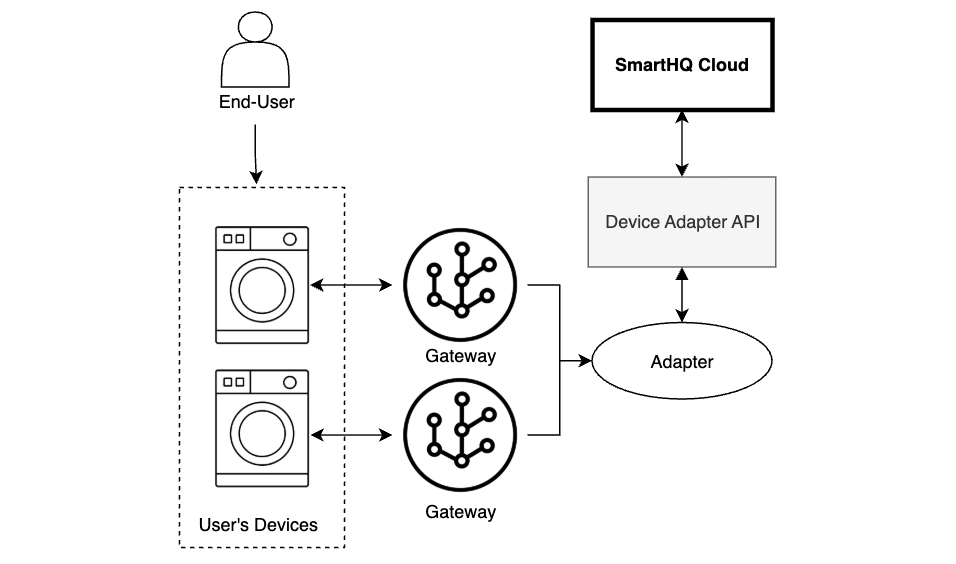
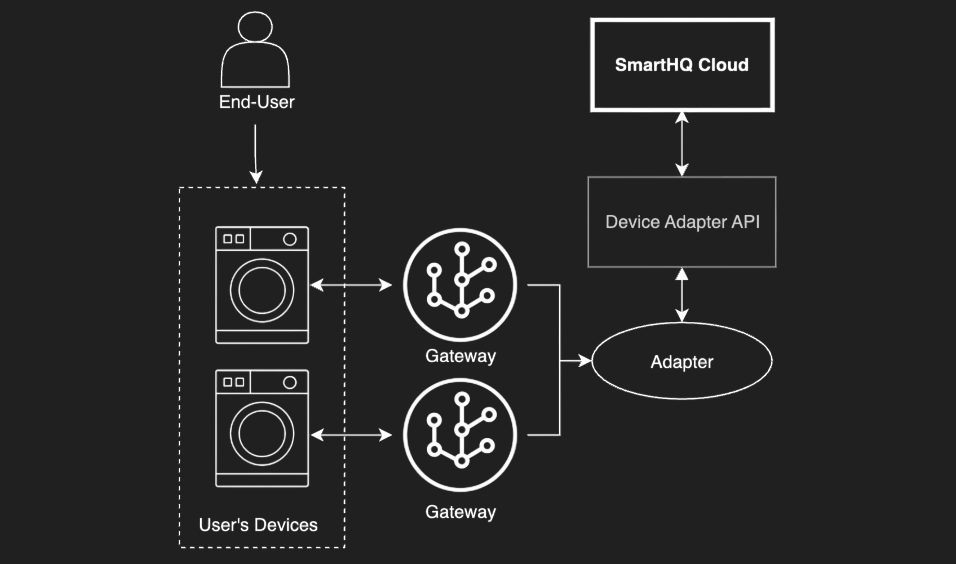
It is a backend service that provides endpoints for registering devices, syncing their state, sending commands, and processing real-time updates. For example, when a user interacts with a physical device, the updated state is reported to SmartHQ through this API, ensuring the system stays in sync with the device's current status.
Gateways and adapters are components that serve as intermediaries, handling communication between the device and SmartHQ by calling the Device Adapter API. They send device state updates to SmartHQ via HTTPS or WebSocket and relay commands from SmartHQ back to the device.
To learn more about this API, see the documentation on Adding External Devices.
Property Management API
The Property Management API provides the functionality that powers the SmartHQ Management app. Disclaimer: If you aren't looking for how to leverage property management features in your application, you can safely skip this API. This API is largely separate from the other APIs listed here. This API should be used if you are looking to leverage similar property management features provided by SmartHQ Management.
Note: The authorization process for this API is Auth0 and is different from the authorization process for leveraging the Digital Twin API.