Conceptual Overview
Goal of Overview
This document aims to explain, as simply as possible, the fundamental concepts behind integrating your third-party device with the SmartHQ cloud.
Integrating Your Device
Fundamentally, the goal is to get data from your device into the SmartHQ cloud in a way that our system can understand. You take your device's data, put it into SmartHQ's data model format, and send it to us. That's it. Once you get the data to us, we take it from there, making it available to clients like the SmartHQ app.
We provide the Device Adapter API, which is the set of endpoints your integration will use to communicate with SmartHQ. How you gather, format, and send that data is an internal implementation detail for you to decide. There's no single "right" way to do it.
While this flexibility lets you choose how to gather and send data, it’s important to note that your device integration must conform to SmartHQ’s established device models1 for each supported device type. For example, thermostats must use the recommended thermostat service model, as this is what the SmartHQ Mobile App and other clients expect.
You could represent a thermostat using several services—such as the mode service for off/cool/heat, the temperature service for the desired temperature, and the toggle service for on/off status. While this approach technically works, it fragments the data and makes integration less cohesive. The thermostat service is designed to represent all of the aspects of a thermostat in a single, unified model, making your integration clearer and easier for SmartHQ clients to consume.
This principle also applies to simpler data. For example, if you want to send temperature data, you could technically use a generic service like the integer service, but instead you should use the temperature service which is designed specifically for reporting temperature values. This makes your integration clearer and ensures SmartHQ clients interpret your data correctly.
Note
Not all device types will have a service with a matching name. For example, if you integrate a lightbulb as cloud.smarthq.device.light, there is not a corresponding service type cloud.smarthq.service.light. Instead, you should use the services that best represent the lightbulb’s capabilities—such as cloud.smarthq.service.toggle for on/off control.
Always choose the most appropriate service that fully represents your device’s capabilities. This ensures your integration is concise, cohesive, and compatible with SmartHQ’s ecosystem. You are in control of how you model your device data, but choosing the most appropriate service makes your integration truly plug-and-play.
The rest of this document will explain the key components and architectural patterns to help you design a solution that best fits your use case, whether you have one device or one million.
Tip
To further your conceptual understanding of the SmartHQ data model—which you will need to use for integrating your device—see the Conceptual Overview of Data Model documentation.
Gateways and Adapters: The Core Components
To understand how to get your data to SmartHQ, you need to understand two core concepts: gateways and adapters. It's important to know that these are loose terms used to describe functions in the system. Don't get stuck on thinking they must be separate, physical things. Often, they can be the same piece of code running on the same machine.
All that matters is that two things happen:
- Data is translated into the SmartHQ data model format.
- Translated data is passed over the internet to SmartHQ.
What is a Gateway?
A gateway is anything that observes the state of a device and is responsible for passing that data over the internet to a destination—whether that's your own cloud or SmartHQ's cloud. Think of it as the mechanism for sending data to SmartHQ.
- In a simple setup, a computer observing the state of a device could be the gateway sending data to SmartHQ.
- In a large-scale IoT deployment, a Wi-Fi module embedded in a device is the gateway.
- In a cloud-to-cloud integration, your cloud could be considered the gateway that forwards data to us.
The gateway's primary job is communication. It's the bridge from your device's world to the broader internet.
What is an Adapter?
An adapter is the component responsible for translating or adapting your device's raw data into the structured JSON format that SmartHQ requires. It takes data in the format your device understands (like a binary representation of on/off state) and transforms it into a service object that the SmartHQ cloud can process (like the toggle service).
A great analogy is an electrical transformer. A power plant generates electricity at a very high voltage, which is unusable for your home. A transformer "adapts" that electricity, stepping it down to a voltage your outlets can safely use. Likewise, your adapter converts your device's raw data into the SmartHQ Data Model.
The adapter is the code that handles the logic of building the JSON payload according to our data model.
Architectural Patterns: Putting It All Together
So, you need something to pass the data (a gateway) and something to translate the data (an adapter). Where you put these pieces and how they interact is completely up to you. Let's explore the two most common patterns.
Pattern 1: The Combined Approach (Gateway is the Adapter)
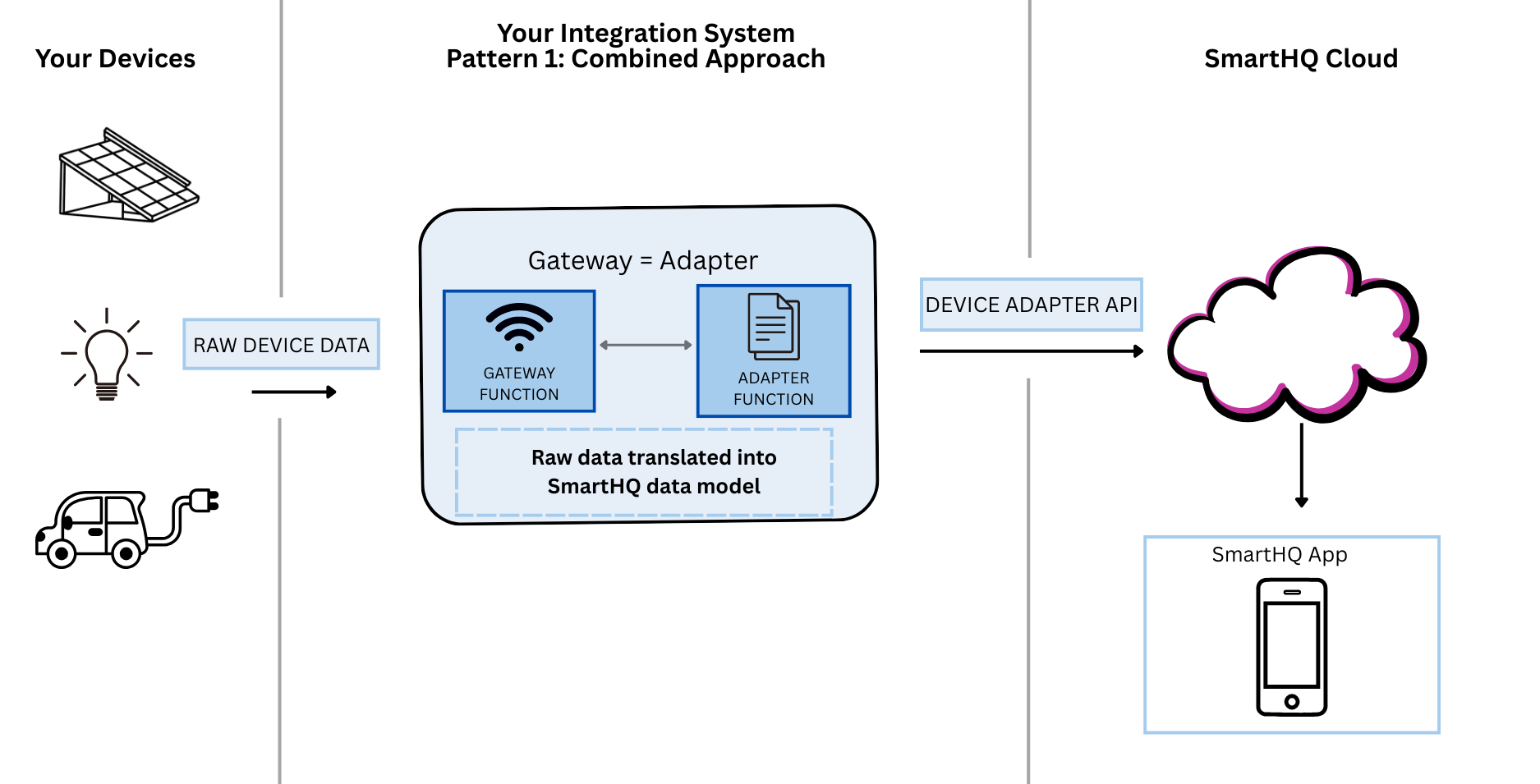
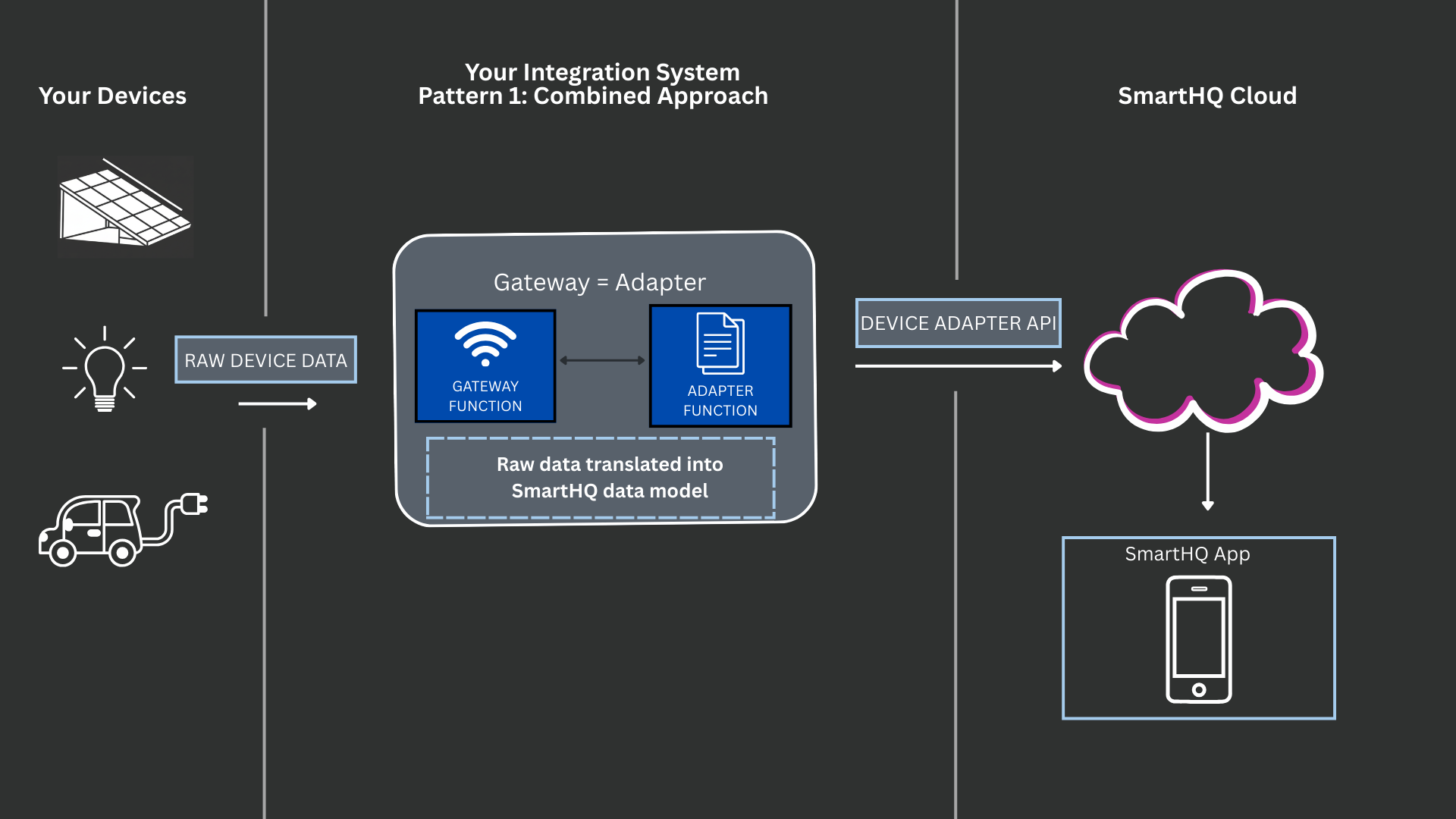
In many scenarios, especially for simpler use cases or single devices, the gateway and the adapter are the same thing.
Imagine you have a solar panel connected to a computer. The computer can run a script that:
- Observes the state of the solar panel (e.g., current power output).
- Translates that data into the required SmartHQ JSON format.
- Sends that formatted JSON directly to the SmartHQ API endpoint.
In this case, the computer is acting as both the gateway and the adapter. The gateway is the adapter. This logic could even run on the device itself if it has sufficient computing power. This is the most direct approach.
Pattern 2: The Layered Approach (Separate Gateway and Adapter)
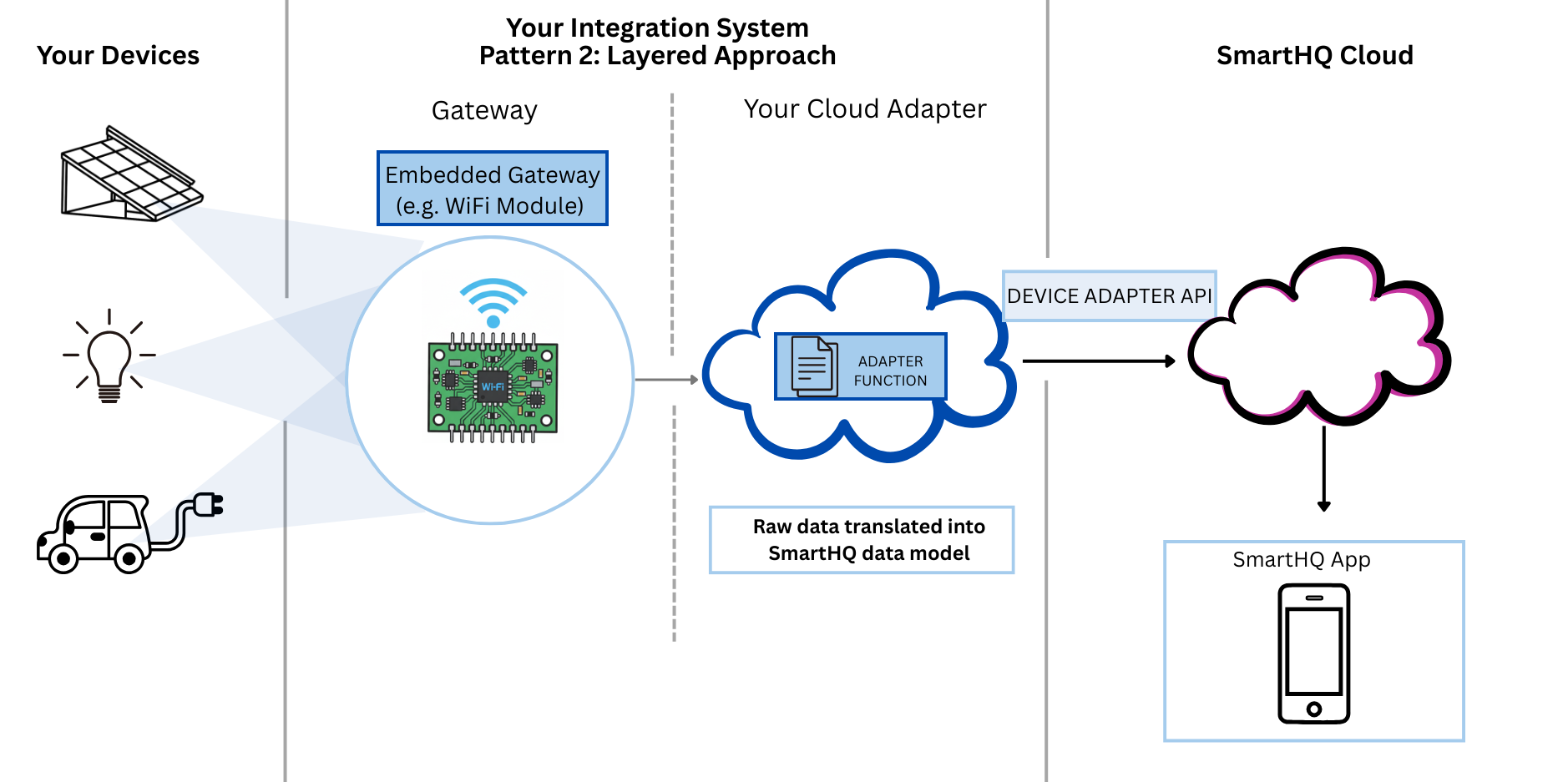
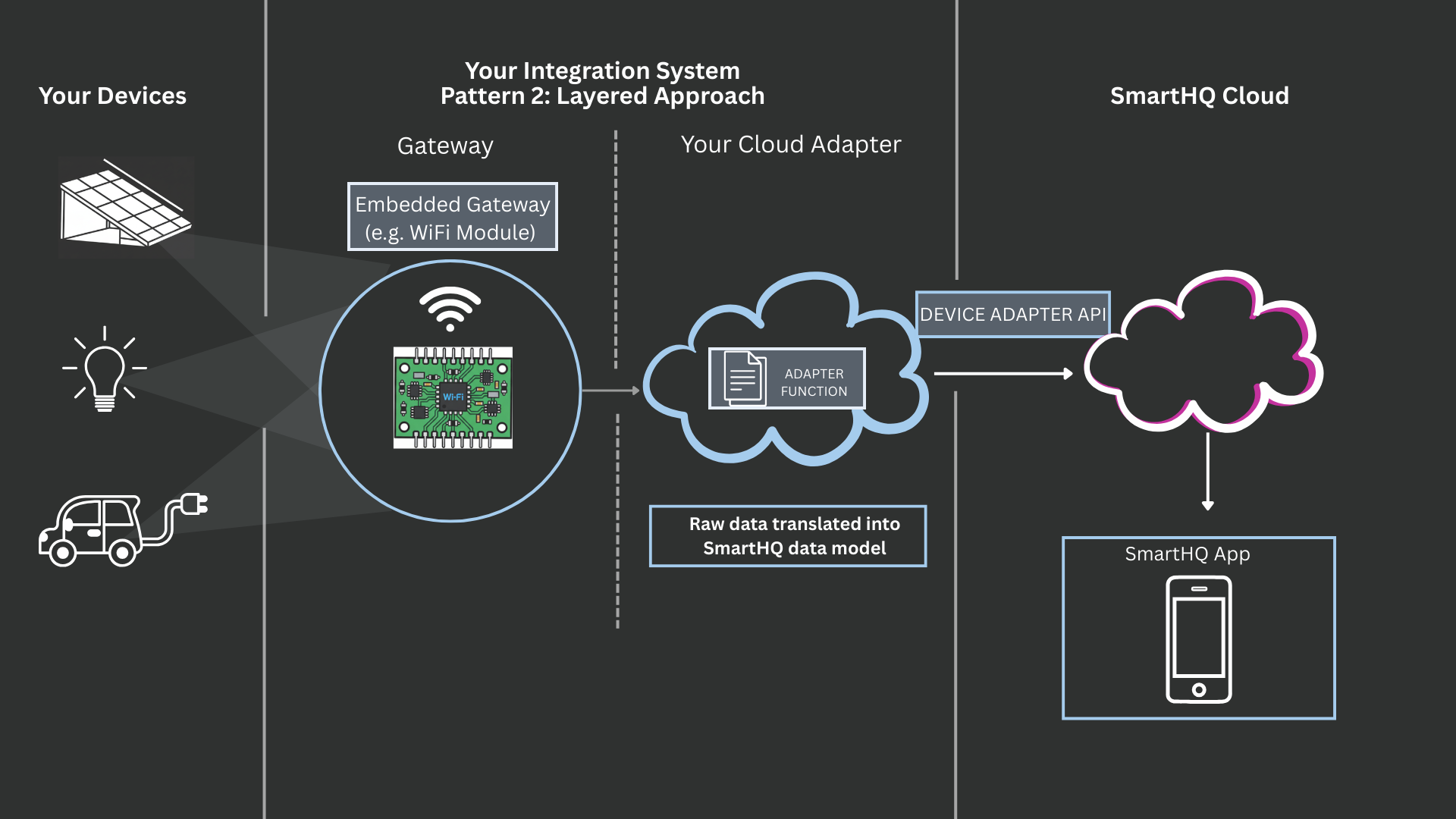
For large device manufacturers with their own cloud infrastructure, a layered approach is more sustainable. This architecture is what much of our documentation is implicitly designed for, but it's not a requirement for everyone.
Consider a company that manufactures millions of Wi-Fi-enabled light bulbs. The recommended architecture would be:
- Device & Gateway: Each light bulb has an embedded gateway (e.g., a Wi-Fi module). This gateway's only job is to observe the bulb's state (on/off, brightness, etc.) and send that raw data to the company's own internal cloud.
- Cloud Adapter: The company's cloud has an adapter application that receives the raw data from all the light bulbs. This central adapter translates the data into the SmartHQ JSON format.
- Sending to SmartHQ: The cloud adapter then sends the properly formatted data to the SmartHQ cloud.
In this model, your cloud adapter is acting as the gateway to SmartHQ, and the Wi-Fi module is acting as the gateway between the device and the manufacturer's cloud. This approach is efficient because the low-powered devices don't need to perform the complex data translation themselves; that work is offloaded to a powerful central cloud service.
Bottom Line
As long as a gateway is passing data and an adapter is putting the data into the SmartHQ format, then you're good. It doesn't matter where these processes live or if they are performed by the same component.
The Flow of Information
Communication is a two-way street. Your device needs to send its status up to SmartHQ cloud, and the SmartHQ cloud needs to send commands down to your device.
Data Flow: Device to SmartHQ (Sending State)
This is the process of reporting your device's status.
- The gateway observes a change in the device state.
- The adapter (wherever it may be) translates this change into a valid SmartHQ service object.
- The adapter or gateway makes a
POSTrequest to the/v2/device/stateendpoint, sending the formatted data to SmartHQ. This requires agatewayAccessTokento authorize the request, linking the data to the correct user account.
Data Flow: SmartHQ to Device (Receiving Commands)
When a user wants to control your device from an app (e.g., change the temperature), the flow is reversed.
- A command is initiated from a client app and sent to SmartHQ.
- SmartHQ sends this command request to an adapter endpoint that you provide.
- The payload we send to your adapter contains the
gatewayIdanddeviceIdso your system knows exactly which device to route the command to.
Think of SmartHQ as an international shipping service. We'll get the package (the command) to your country's border (your adapter's callback URL). Once we hand it off, your country's internal postal service (your system's logic) is responsible for delivering it to the right city (adapterGatewayId) and to the right street address (deviceId). We provide the addressing information (adapterGatewayId, deviceId) that you supplied when commissioning your gateway and devices. You are responsible for the "last mile" delivery—routing the command from your adapter to the correct device.
-
To view the established device models, navigate to the SmartHQ Data Model documentation, . ↩